How to Remove a Car Radio (Stereo) From the Dash
To remove a car radio, first work out how it's held in. Many cars hide screws behind a clip-on trim surround that you pry off with nylon trim tools, while many older European factory radios and most aftermarket single DIN units lock into the dash and come out with a pair of DIN removal keys. Either way, have your radio security code ready and follow your manual on disconnecting the battery before you start taking the dash apart.
What you need
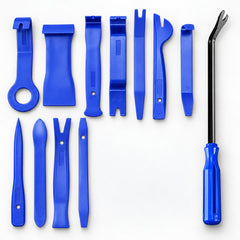
- A trim removal tool kit. The nylon pry tools pop the radio surround off without gouging the dash, which a metal screwdriver easily does.
- Radio removal (DIN) keys that match your radio, if it has key slots. Keys differ between radio types, so check yours.
- Screwdrivers or small sockets for the bracket screws. A 46-piece 1/4-inch socket and bit set has 4 to 14 mm sockets, Phillips and Torx T10-T40 bits, and extensions for screws deep in the dash.
- Your radio security code, if your car uses one
- Masking tape, a towel to rest the radio on, and your phone to photograph connectors
Before you start
- Find the radio code. Some factory radios, including many Honda and Acura units and some older European ones, lock themselves when power is cut and ask for a code. It's often on a card with the owner's manual or a sticker in the glove box. If you can't find it, a dealer can usually supply it with proof of ownership. Get it before you disconnect anything.
- Battery and airbags. The passenger airbag sits in the dash on most cars, and some have a knee airbag below it. If your manual says to disconnect the battery before dash work, turn the ignition off, disconnect the negative terminal and wait the time it specifies. Never unplug or probe airbag connectors, which are usually yellow. Even when it isn't required, disconnecting the battery stops you shorting the radio's power wires against metal in the dash.
- Know what resets. Cutting power usually clears radio presets and the clock, and on some cars the one-touch windows need resetting afterwards. Your manual explains how.
- Check a model-specific guide. Screw locations and trim order vary a lot. A quick look at a guide or video for your exact car saves you prying against a hidden screw.
How your radio is held in
| Mounting | How to spot it | What removes it |
|---|---|---|
| Screws behind a trim surround | No holes or slots in the radio face; the radio sits inside a larger dash panel | Nylon trim tools, then a screwdriver or small sockets |
| Factory radio with key slots | Small slots or holes on both sides of the faceplate, sometimes under little covers | Matching U-shaped or flat removal keys |
| Aftermarket single DIN in a sleeve | A unit about 180 x 50 mm with a plastic trim ring around it | The flat keys supplied with the radio |
| Aftermarket double DIN | A unit about 180 x 100 mm, often a touchscreen | Usually screwed to side brackets behind the dash trim |
Method 1: Radio behind a trim surround
- Put masking tape on the dash along the surround's edges to protect it if a tool slips.
- Look for screws first: inside storage cubbies, under removable trays or rubber mats, around the climate controls and along the surround's edges.
- Find a starting gap, usually at a bottom corner, and slide in the thinnest nylon pry tool. Then switch to a wider tool to spread the load.
- Work around the edge and lever right next to each clip, never in the middle of the panel. Release the clips one at a time. Old plastic clips can still snap, so have a few spares; they're cheap.
- Ease the surround forward and unplug anything attached to it, such as the hazard switch or climate panel. Press the release tab; don't pull on wires.
- Remove the screws or bolts holding the radio's brackets. They're often Phillips screws or small hex bolts. Keep them in a tray.
- Slide the radio forward, supporting its weight so it never hangs on its wires.
Method 2: Factory radio with DIN removal keys
- Find the slots on each side of the faceplate. Some sit under small covers you can lift out with a thin pry tool. Some radios need two pairs of keys.
- Push the keys straight in until you feel or hear a click. On many radios that's about an inch. Don't force them: if they won't seat, they're probably the wrong keys or in the wrong slots.
- Pull back evenly on both keys. On some radios you also need to press the keys slightly outward to release the spring clips.
- Once the radio is partly out, pull it forward by its case and unplug it at the back.
- To free the keys afterwards, press in the spring clips on the sides of the radio's case.
Can you do it without the keys? Improvised tools, such as stiff wire bent into a U or thin metal strips, sometimes work, but they can bend the release clips or get stuck inside. Proper keys are inexpensive and much less likely to damage anything.
Method 3: Aftermarket single DIN radio
- If the radio has a detachable faceplate, take it off first.
- Pop off the trim ring around the front with a fingernail or a thin nylon tool to reveal the key slots.
- Slide the flat keys that came with the radio into the slots on each side until they click.
- Pull the radio straight out of its metal sleeve. The sleeve usually stays in the dash.
- If it sticks partway, the support stud at the back may be caught in its bracket. Wiggle the radio gently as you pull rather than prying.
Unplug the back of the radio
Photograph the back of the radio before you unplug anything.
- Main harness: power and speaker wires, often in one or two large plugs. Many European cars use a standard ISO connector. Press the latch and pull on the plug body.
- Antenna lead: on older cars it pulls straight out. Newer cars often use a small latching plug: press the latch first.
- Extras: USB, aux, GPS antenna, microphone and steering wheel control plugs. Some cars also use fiber optic cables, which are delicate: don't kink or bend them tightly.
Troubleshooting and mistakes to avoid
- The surround won't release. There's almost always a hidden screw. Stop prying and look again.
- The keys won't click. Wrong keys, wrong slots, or the keys need flipping. Check a guide for your radio.
- The radio won't slide out. A bracket screw is still in, a clip hasn't released, or the rear support is caught. Don't lever on the faceplate.
- The radio shows CODE. Enter your security code. Don't guess: many radios lock you out for longer after several wrong entries.
- A warning light stays on after you reconnect the battery. If it's the airbag light, have it checked rather than ignoring it.
- Prying with a metal screwdriver. It gouges soft dash plastic and makes broken trim clips more likely.
Replacing the radio, not just removing it
Fitting an aftermarket radio usually takes a few vehicle-specific parts: a dash kit to fill the opening, a wiring harness adapter that plugs into the factory connector so you don't cut any wires, an antenna adapter if the plugs differ, and an interface if you want to keep the steering wheel buttons. Cars with a factory amplifier or a screen that also runs the climate or vehicle settings may need more specialized interfaces, so check before you buy. Test every function before you snap the trim back on. If you're upgrading the sound, our guide on how to replace car door speakers covers sizing, adapters and polarity.
When to call a pro
Let a shop handle it if the radio is built into a large screen that also controls climate or vehicle settings, if the job means working around airbags and you're not confident with the precautions, or if a warning light appears after the work.
FAQ
How do you remove a car radio without removal keys?
If your radio has no key slots, you don't need keys: it's held by screws behind the trim. If it does have slots, improvised tools sometimes work but can bend the release clips. Keys for your radio type are cheap and safer.
Do I need to disconnect the battery to remove a car radio?
Follow your manual. It's required on some cars because of nearby airbags, and it's a sensible precaution on the rest because it prevents short circuits. Get your radio code first.
Will disconnecting the battery reset my radio?
It usually clears presets and the clock. On cars with an anti-theft radio, the radio may also ask for its security code when power returns.
How do you remove a double DIN radio?
Most double DIN units are screwed to side brackets. Remove the dash trim around the radio with nylon pry tools, undo the bracket screws and slide the unit out. Some aftermarket units use a sleeve and keys like single DIN radios.
What is the difference between single DIN and double DIN?
It's the size of the opening. A single DIN radio is about 180 x 50 mm (7 x 2 inches) at the front; a double DIN is the same width and twice the height, about 180 x 100 mm (7 x 4 inches).
Working on the doors as well? See how to remove a car door panel without breaking clips.
Browse all trim and interior tools.